# PHP Wrapper
PD4ML is a pure-Java library, with no native PHP binding -- but since a Java Virtual Machine can be invoked as an ordinary external process, PHP can drive it perfectly well by shelling out to the [`Pd4Cmd`](https://pd4ml.com/pd4cmd-command-line-tool/) command-line tool and streaming its output straight back to the browser. This page walks through the reference wrapper package PD4ML publishes for exactly that pattern: a small set of PHP scripts, a couple of Perl/CGI fallbacks for restricted hosting environments, and a minimal "convert this page to PDF" button implemented from scratch. The only server-side prerequisite is a Java 1.4 or later runtime reachable from PHP's execution environment.
## Installation and environment test
The starting point is the [`pd4ml_php_wrapper.zip`](https://pd4ml.com/v3-eval/java/php/) archive, which bundles two PD4ML jar files alongside three directories:
* **`probe/`** -- an environment test script, plus demo documents and demo conversion scripts.
* **`fonts/`** -- a Chinese font file, used to demonstrate TrueType font embedding for non-Latin scripts.
* **`cgi-bin/`** -- Perl CGI scripts, for hosting environments whose PHP runtime configuration doesn't permit shelling out to Java at all (see [PHP configurations that disallow external processes](#php-configurations-that-disallow-external-processes) below).
Upload the unpacked archive contents to the server, and confirm the web server has read/write permissions on the target directory and that the directory is PHP-enabled. Assuming that directory is reachable at `http://myserver/pd4ml/`, opening `http://myserver/pd4ml/probe/index.php` runs the environment test; a successful run looks like this:
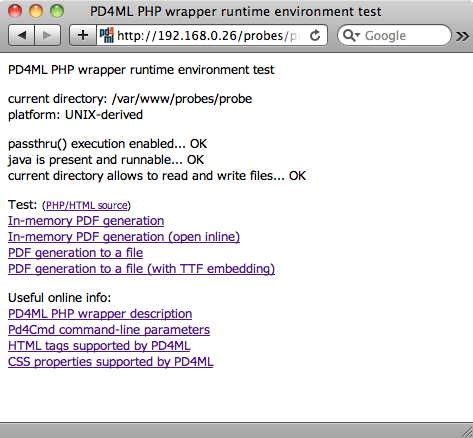
If any check fails, the probe script prints a specific suggestion for fixing it; once the minimum requirements are satisfied, it enables links through to the bundled demo conversion scripts.
### Customizing the demo scripts
The demo scripts expose four variables for adapting them to a given deployment:
| Variable | Purpose |
| ------------- | -------------------------------------------------------------------------------------------------------------------------------------------------------------------------------------------------- |
| `$evaluation` | Switches between the trial jar (`pd4ml_demo.jar`) and the licensed one (`pd4ml.jar`). Set to `0` once a purchased `pd4ml.jar` is deployed. |
| `$jar` | Location of the PD4ML jar(s). The demos default to `../pd4ml_demo.jar`, assuming the library sits one directory up. |
| `$java` | Path to the Java executable. Leaving it as `java` is enough when the server's `$PATH` already resolves it correctly; otherwise, point it at the interpreter directly (e.g. `/usr/local/bin/java`). |
| `$url` | The URL of the document to convert to PDF. |
### PHP configurations that disallow external processes
A shared-hosting PHP configuration will sometimes disable the functions (`passthru`, `exec`, `shell_exec`, ...) needed to invoke Java as a subprocess at all. For exactly this situation, the wrapper package's `cgi-bin/` directory includes two Perl CGI scripts as a fallback: `probe.pl` mirrors the PHP environment test, and `pd4ml.pl` is a general-purpose converter that expects the source document's URL as a `url` HTTP parameter -- functionally equivalent to `pd4ml.php` in the walkthrough below.
Copy both scripts into the server's CGI-BIN directory, and make sure their file permissions allow execution -- mode `755` is the common default on UNIX-derived systems. Then update each script's `$jar` variable to point at the actual `pd4ml(_demo).jar` location, the same as for the PHP demo scripts above.
## Building an "As PDF" button from scratch
Rather than relying on the bundled demos, a minimal "convert the current page to PDF" button is only a few lines of PHP: a converter script that shells out to `Pd4Cmd`, a helper to reconstruct the current page's URL, and a form button that posts that URL to the converter.
The converter, `pd4ml.php`, reads the source URL from the POST body and streams `Pd4Cmd`'s PDF output directly back as the response:
```php
```
`curPageURL()` reconstructs the URL of whatever page includes the button, so the same snippet can be dropped onto any page without hard-coding its address:
```php
```
And the button itself is an ordinary form posting to `pd4ml.php`:
```html
```
## Useful info
A handful of details are easy to miss when adapting this pattern to a real deployment:
* **Deployment footprint.** Copy `pd4ml.jar` (or `pd4ml_demo.jar` during evaluation), `ss_css2.jar`, and `pd4ml.php` itself into any PHP-enabled directory on the web server -- nothing else is required.
* **Hiding the button from the PDF.** The inline style `pd4ml-display: none; pd4ml-visibility: hidden` on the submit button is PD4ML-specific CSS that excludes the element from the converted PDF layout, so the button itself doesn't appear in its own output.
* **Multi-site hosting.** `curPageURL()` as shown hard-codes `localhost` as the server name, which breaks as soon as the script is deployed to a server hosting more than one site. Replace it with the server's actual hostname in that situation.
* **Page margins.** Two independent controls exist: the source HTML document's own margins are ordinary CSS (`BODY { margin: 0 }`), while the PDF page's margins (insets) are set via `Pd4Cmd`'s `-insets TOP,LEFT,BOTTOM,RIGHT,units` parameter -- for example, `-insets 10,20,10,10,mm`.
* **Orientation.** The default page orientation is portrait; pass `-orientation LANDSCAPE` to change it.
* **Headers and footers (licensed feature).** Page headers/footers can be defined as HTML, e.g. ` page $[page] of $[total]` -- see the Programmer's Manual's [headers, footers, watermarks, and backgrounds](https://app.gitbook.com/o/PRV789nwdRDeMr7n5jjH/s/33dI66uC6sTAcaPjppX2/) section for the full placeholder and scoping syntax.
* **Saving instead of streaming.** To write the generated PDF to disk rather than sending it to the client's browser, add `-out /generated/file/location/file.pdf` to the `Pd4Cmd` command line and remove the `header('Content-type: application/pdf');` line from `pd4ml.php`.
## See also
* [List of HTML tags supported by PD4ML](https://pd4ml.com/html-elements-list/)
* [List of CSS properties supported by PD4ML](https://pd4ml.com/css-keywords/)
* [RTF and DOCX Output](https://app.gitbook.com/s/cjbNvevStmXi1uYduM7U/) -- the same `Pd4Cmd`/API conversion pattern, targeting Word-compatible formats instead of PDF.
* [PD4ML Programmer's Manual](https://app.gitbook.com/o/PRV789nwdRDeMr7n5jjH/s/33dI66uC6sTAcaPjppX2/) -- §4 covers `Pd4Cmd`'s full flag reference for the Java integration this wrapper shells out to.
page $[page] of $[total]` -- see the Programmer's Manual's [headers, footers, watermarks, and backgrounds](https://app.gitbook.com/o/PRV789nwdRDeMr7n5jjH/s/33dI66uC6sTAcaPjppX2/) section for the full placeholder and scoping syntax.
* **Saving instead of streaming.** To write the generated PDF to disk rather than sending it to the client's browser, add `-out /generated/file/location/file.pdf` to the `Pd4Cmd` command line and remove the `header('Content-type: application/pdf');` line from `pd4ml.php`.
## See also
* [List of HTML tags supported by PD4ML](https://pd4ml.com/html-elements-list/)
* [List of CSS properties supported by PD4ML](https://pd4ml.com/css-keywords/)
* [RTF and DOCX Output](https://app.gitbook.com/s/cjbNvevStmXi1uYduM7U/) -- the same `Pd4Cmd`/API conversion pattern, targeting Word-compatible formats instead of PDF.
* [PD4ML Programmer's Manual](https://app.gitbook.com/o/PRV789nwdRDeMr7n5jjH/s/33dI66uC6sTAcaPjppX2/) -- §4 covers `Pd4Cmd`'s full flag reference for the Java integration this wrapper shells out to.