# Using PD4ML with Zend Framework 2 (ZF2)
This walkthrough adds a "Page as PDF" button to a Zend Framework 2 view, using the Zend Framework tutorial's own **Albums** sample application as the base. It builds directly on the [PHP Wrapper](php-wrapper) pattern -- shelling out to the `Pd4Cmd` command-line tool from a small PHP script -- so it's worth reading that page first if the general approach is unfamiliar.
{% hint style="info" %}
This page was checked against the current PD4ML source before republishing, not just carried over. The Zend Framework 2 side of the walkthrough (the controller action, the view template, the module config) is unchanged, since none of that depends on PD4ML internals. What did need correcting is the `Pd4Cmd` invocation itself:
The original sample invokes it as `java ... -cp $jar Pd4Cmd ...` -- a bare, unqualified `Pd4Cmd` class name. That hasn't resolved for some time: `Pd4Cmd` lives in the `com.pd4ml.tools` package, not the default package, so a plain classpath launch needs the fully-qualified name. The packaged jar's manifest already declares `com.pd4ml.tools.Pd4Cmd` as its `Main-Class`, so the simplest fix -- and the form PD4ML's own command-line reference documents -- is to drop `-cp`/the class name entirely and launch the jar directly with `-jar`. Both PHP scripts below use the corrected form.
{% endhint %}
## Prerequisites
Follow the [Zend Framework 2 tutorial](http://framework.zend.com/manual/2.0/en/user-guide/overview.html) far enough to get the **Albums** demo application running.
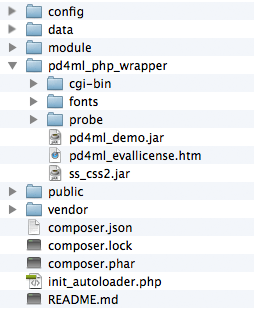
Then set up PD4ML's PHP wrapper against that application, as described in [PHP Wrapper](php-wrapper): download the wrapper package, unpack it into the application root, confirm a Java runtime is reachable from PHP, and run the bundled environment probe script to confirm everything is wired up. The unpacked wrapper should sit alongside the ZF2 application like this:
## Adding a "Page as PDF" button to a view
The example adds a "Page as PDF" button to the album list. As a feature this is mostly illustrative -- in a real deployment, you'd typically point the PD4ML converter directly at a known, print-optimized report or invoice URL rather than working out the current page's URL through an HTTP referrer, as this example does for generality.
**1. Add a PDF-generation link to the album list view**, `module/Album/view/album/album/index.phtml`:
```html
...
| |
|
Page as PDF
|
```
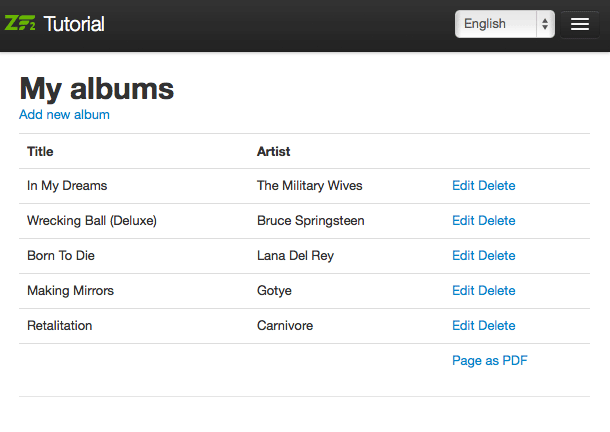
(The added section sits between the `edit begin`/`edit end` comments.) The `pd4ml-display: none` style hides the link itself from the generated PDF -- confirmed still supported in the current PD4ML CSS engine -- since a self-referential "convert to PDF" link makes no sense inside its own PDF output.
With the link in place, the album list looks like this, pointing at a new, not-yet-handled `pdf` action:
**2. Add the `pdf` action handler** to `module/Album/src/Album/Controller/AlbumController.php`:
```php
public function pdfAction()
{
$url = $this->getRequest()->getHeader('Referer')->getUri();
$enc = base64_encode($url);
$this->redirect()->toUrl($this->getRequest()->getBaseUrl() . '/pd4ml.php?url=' . $enc);
}
```
The handler reads the referring page's URL -- the album list, in this case -- and forwards it to the converter script as a `url` parameter, base64-encoding it to sidestep any issues with special characters.
**3. Create the converter script**, `public/pd4ml.php`, which the redirect above targets:
```php
```
Make sure there's no whitespace before ``.
The script decodes the `url` parameter, converts that URL to a PDF via `Pd4Cmd`, and streams the resulting bytes back as the HTTP response. It also appends a `?layout=pdf` parameter to the URL before conversion, which the next step uses to signal the application to switch to a PDF-optimized layout.
**4. Add a PDF-optimized layout template.** The [original album list view](#adding-a-page-as-pdf-button-to-a-view) includes a navigation bar, which belongs in an interactive web page but adds nothing useful to a printed/PDF document. Copy `module/Application/view/layout/layout.phtml` to `blank.phtml` in the same directory, and strip the navigation bar out:
```html
doctype(); ?>
headTitle('ZF2 '. $this->translate('Skeleton Application'))->setSeparator(' - ')->setAutoEscape(false) ?>
headMeta()->appendName('viewport', 'width=device-width, initial-scale=1.0') ?>
headLink(array('rel' => 'shortcut icon', 'type' => 'image/vnd.microsoft.icon', 'href' => $this->basePath() . '/images/favicon.ico'))
->appendStylesheet($this->basePath() . '/css/bootstrap.min.css')
->appendStylesheet($this->basePath() . '/css/style.css')
->appendStylesheet($this->basePath() . '/css/bootstrap-responsive.min.css') ?>
headScript()->appendFile($this->basePath() . '/js/html5.js', 'text/javascript', array('conditional' => 'lt IE 9',))
->appendFile($this->basePath() . '/js/jquery-1.7.2.min.js') ?>
content; ?>
```
**5. Register the new template** in `module/Album/config/module.config.php`:
```js
'view_manager' => array(
'template_path_stack' => array(
'album' => __DIR__ . '/../view',
),
),
// edit begin
'template_map' => array(
'layout/blank' => __DIR__ . '/../view/layout/blank.phtml',
),
// edit end
```
**6. Switch templates based on the `layout` query parameter**, in `module/Album/src/Album/Controller/AlbumController.php`'s `index` action:
```js
public function indexAction()
{
// edit begin
$flag = $this->params()->fromQuery('layout');
if ('pdf' == $flag) {
$layout = $this->layout();
$layout->setTemplate('layout/blank');
}
// edit end
return new ViewModel(array(
'albums' => $this->getAlbumTable()->fetchAll(),
));
}
```
With all six steps in place, clicking "Page as PDF" produces a navigation-free PDF like [this example result](http://old.pd4ml.com/i/zend/pd4ml.php.pdf).
The complete application structure (excluding the PD4ML PHP wrapper itself, which is covered separately in [PHP Wrapper](php-wrapper)) is available as a [downloadable archive](http://old.pd4ml.com/i/zend/zf2.zip). Remember to adjust the database credentials in `config/autoload/local.php` before running it.
## See also
* [PHP Wrapper](php-wrapper) -- the general PD4ML-from-PHP pattern this walkthrough builds on, including deployment and troubleshooting notes.
* [Pd4Cmd Command-Line Reference](https://app.gitbook.com/s/33dI66uC6sTAcaPjppX2/pd4cmd-command-line-reference) -- the full, current flag reference for the `Pd4Cmd` invocation used by `pd4ml.php` above.