
PHP Wrapper
This page describes the PD4ML v3-era approach. To use PD4ML from PHP today, install PD4ML for PHP with Composer (composer require pd4ml/pd4ml-php): it exposes the complete PD4ML Java API to PHP, downloads PD4ML itself, and needs no Pd4Cmd command lines.
PD4ML is a pure-Java library, with no native PHP binding -- but since a Java Virtual Machine can be invoked as an ordinary external process, PHP can drive it perfectly well by shelling out to the Pd4Cmd command-line tool and streaming its output straight back to the browser. This page walks through the reference wrapper package PD4ML publishes for exactly that pattern: a small set of PHP scripts, a couple of Perl/CGI fallbacks for restricted hosting environments, and a minimal "convert this page to PDF" button implemented from scratch. The only server-side prerequisite is a Java 1.4 or later runtime reachable from PHP's execution environment.
Installation and environment test
The starting point is the pd4ml_php_wrapper.zip archive, which bundles two PD4ML jar files alongside three directories:
probe/-- an environment test script, plus demo documents and demo conversion scripts.fonts/-- a Chinese font file, used to demonstrate TrueType font embedding for non-Latin scripts.cgi-bin/-- Perl CGI scripts, for hosting environments whose PHP runtime configuration doesn't permit shelling out to Java at all (see PHP configurations that disallow external processes below).
Upload the unpacked archive contents to the server, and confirm the web server has read/write permissions on the target directory and that the directory is PHP-enabled. Assuming that directory is reachable at http://myserver/pd4ml/, opening http://myserver/pd4ml/probe/index.php runs the environment test; a successful run looks like this:
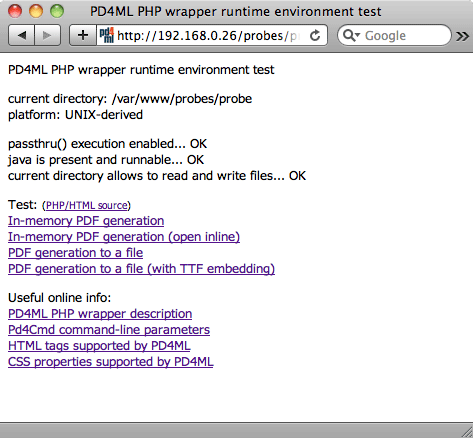
If any check fails, the probe script prints a specific suggestion for fixing it; once the minimum requirements are satisfied, it enables links through to the bundled demo conversion scripts.
Customizing the demo scripts
The demo scripts expose four variables for adapting them to a given deployment:
| Variable | Purpose |
|---|---|
$evaluation |
Switches between the trial jar (pd4ml_demo.jar) and the licensed one (pd4ml.jar). Set to 0 once a purchased pd4ml.jar is deployed. |
$jar |
Location of the PD4ML jar(s). The demos default to ../pd4ml_demo.jar, assuming the library sits one directory up. |
$java |
Path to the Java executable. Leaving it as java is enough when the server's $PATH already resolves it correctly; otherwise, point it at the interpreter directly (e.g. /usr/local/bin/java). |
$url |
The URL of the document to convert to PDF. |
PHP configurations that disallow external processes
A shared-hosting PHP configuration will sometimes disable the functions (passthru, exec, shell_exec, ...) needed to invoke Java as a subprocess at all. For exactly this situation, the wrapper package's cgi-bin/ directory includes two Perl CGI scripts as a fallback: probe.pl mirrors the PHP environment test, and pd4ml.pl is a general-purpose converter that expects the source document's URL as a url HTTP parameter -- functionally equivalent to pd4ml.php in the walkthrough below.
Copy both scripts into the server's CGI-BIN directory, and make sure their file permissions allow execution -- mode 755 is the common default on UNIX-derived systems. Then update each script's $jar variable to point at the actual pd4ml(_demo).jar location, the same as for the PHP demo scripts above.
Building an "As PDF" button from scratch
Rather than relying on the bundled demos, a minimal "convert the current page to PDF" button is only a few lines of PHP: a converter script that shells out to Pd4Cmd, a helper to reconstruct the current page's URL, and a form button that posts that URL to the converter.
The converter, pd4ml.php, reads the source URL from the POST body and streams Pd4Cmd's PDF output directly back as the response:
<?
  header("Pragma: cache");
  header("Expires: 0");
  header("Cache-control: private");

  if (array_key_exists('url', $_POST)) {

    header('Content-type: application/pdf');
    header('Content-disposition: inline');
    //header('Content-disposition: attachment; filename=test.pdf');

    // UNIX version
    passthru('java -Xmx512m -Djava.awt.headless=true ' .
      '-cp pd4ml_demo.jar Pd4Cmd \'' . $_POST['url'] . '\' 800 A4');

    // Windows version
    // passthru('java -Xmx512m ' .
    // ' -cp pd4ml_demo.jar Pd4Cmd \"' . $_POST['url'] . '\" 800 A4');

  } else {
    echo 'invalid usage';
  }
?>
curPageURL() reconstructs the URL of whatever page includes the button, so the same snippet can be dropped onto any page without hard-coding its address:
<?php
// the function determines the current page URL
function curPageURL() {
  $pageURL = 'http';
  if ($_SERVER["HTTPS"] == "on") {
	$pageURL .= "s";
  }
  $pageURL .= "://";

  if ($_SERVER["SERVER_PORT"] != "80") {
    $pageURL .= "localhost:".$_SERVER["SERVER_PORT"].$_SERVER["REQUEST_URI"];
  } else {
    $pageURL .= "localhost".$_SERVER["REQUEST_URI"];
  }
  return $pageURL;
}
?>
And the button itself is an ordinary form posting to pd4ml.php:
<!-- the button -->
<form action="pd4ml.php" method=post>
<input type=hidden value="<?php echo curPageURL(); ?>" name=url>
<input style="pd4ml-display: none; pd4ml-visibility: hidden"
    type=submit value="<b>Get the invoice as PDF</b>">
</form>
Useful info
A handful of details are easy to miss when adapting this pattern to a real deployment:
- Deployment footprint. Copy
pd4ml.jar(orpd4ml_demo.jarduring evaluation),ss_css2.jar, andpd4ml.phpitself into any PHP-enabled directory on the web server -- nothing else is required. - Hiding the button from the PDF. The inline style
pd4ml-display: none; pd4ml-visibility: hiddenon the submit button is PD4ML-specific CSS that excludes the element from the converted PDF layout, so the button itself doesn't appear in its own output. - Multi-site hosting.
curPageURL()as shown hard-codeslocalhostas the server name, which breaks as soon as the script is deployed to a server hosting more than one site. Replace it with the server's actual hostname in that situation. - Page margins. Two independent controls exist: the source HTML document's own margins are ordinary CSS (
BODY { margin: 0 }), while the PDF page's margins (insets) are set viaPd4Cmd's-insets TOP,LEFT,BOTTOM,RIGHT,unitsparameter -- for example,-insets 10,20,10,10,mm. - Orientation. The default page orientation is portrait; pass
-orientation LANDSCAPEto change it. - Headers and footers (licensed feature). Page headers/footers can be defined as HTML, e.g.
<pd4ml:page.header><img src="logo.gif"> page $[page] of $[total]</pd4ml:page.header>-- see the Programmer's Manual's headers, footers, watermarks, and backgrounds section for the full placeholder and scoping syntax. - Saving instead of streaming. To write the generated PDF to disk rather than sending it to the client's browser, add
-out /generated/file/location/file.pdfto thePd4Cmdcommand line and remove theheader('Content-type: application/pdf');line frompd4ml.php.
See also
- RTF and DOCX Output -- the same
Pd4Cmd/API conversion pattern, targeting Word-compatible formats instead of PDF. - PD4ML Programmer's Manual -- §4 covers
Pd4Cmd's full flag reference for the Java integration this wrapper shells out to.