
Vertical Writing Modes: Japanese and Chinese Vertical Text, Sideways Text
Japanese and Chinese are traditionally set in vertical lines, read top to bottom, the lines following each other from right to left; vertical labels on table headers and chart axes are common in any language. CSS writes text vertically with writing-mode. PD4ML lays vertical text out as Chrome does - characters upright or turned as the Unicode standard says, punctuation in its vertical forms, lines wrapping into further columns - in PDF, image and Word output.
.tategaki {
  writing-mode: vertical-rl;
  height: 150mm;
  line-height: 1.6;
}
Available from PD4ML v4.2.0, with the v42 layout engine: call useHtmlRenderer(Constants.LayoutEngine.v42) before readHTML().
PD4ML pd4ml = new PD4ML();
pd4ml.useHtmlRenderer(Constants.LayoutEngine.v42);
pd4ml.readHTML(new URL("file:tategaki.html"));
pd4ml.writePDF(new FileOutputStream("tategaki.pdf"));
The screenshots on this page are PD4ML output of the sample document.
What is supported
| Property | Values | Notes |
|---|---|---|
writing-mode |
horizontal-tb, vertical-rl, vertical-lr, sideways-rl, sideways-lr |
also the SVG/IE keywords tb, tb-rl (as vertical-rl), lr, rl |
text-orientation |
mixed, upright, sideways |
mixed: CJK upright, other text turned 90° clockwise |
text-combine-upright |
all, none |
the text of an element - a two-digit number, a date - set across the line in one character's cell |
direction |
ltr, rtl |
rtl: lines start at the bottom |
text-align |
start, end, left, right, center |
along the line: left is the top, right the bottom |
line-height |
the width of a line (column) | |
height |
where lines wrap (else the page's height) |
Vertical text applies to block containers, inline-blocks and table cells, and to grid and flex items; a vertical element inside horizontal content is as wide as its lines.
Characters, vertical forms and metrics
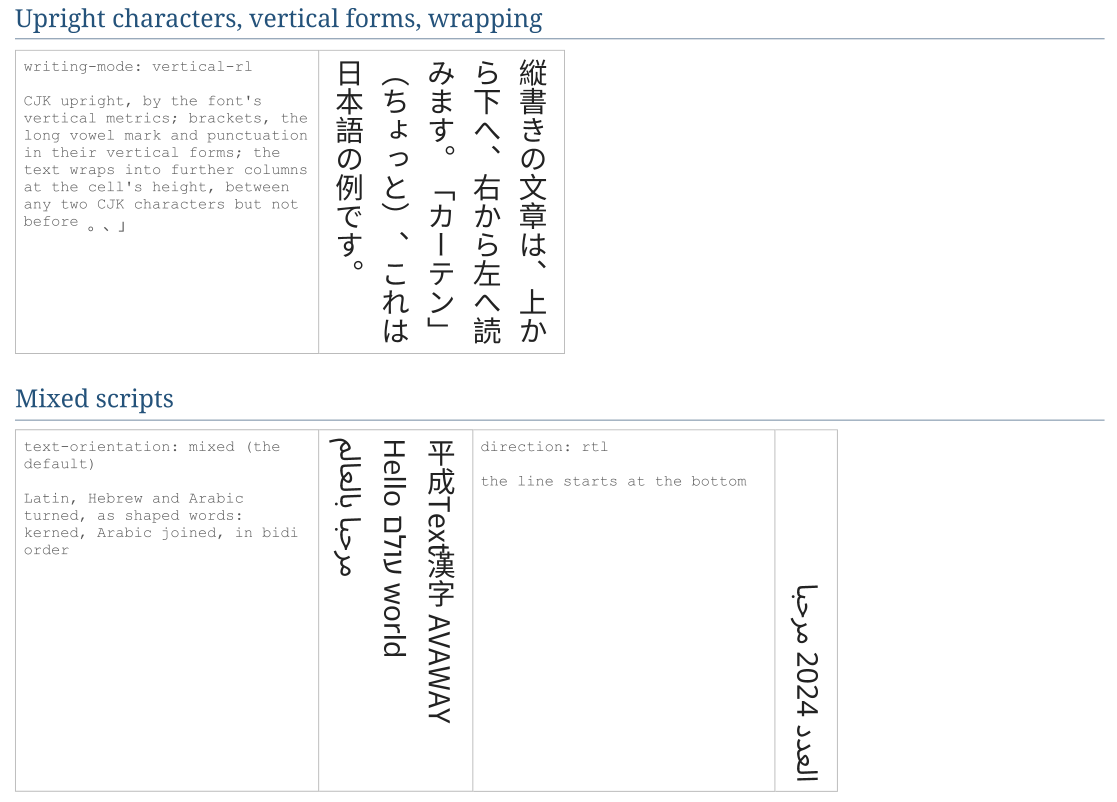
- Upright or turned. With
text-orientation: mixedeach character is upright or turned 90° clockwise by its Unicode Vertical_Orientation (UAX #50): ideographs, kana, hangul, full-width forms and many symbols stay upright; Latin, Cyrillic, Greek, Hebrew, Arabic and digits are turned. - Vertical forms. Upright characters are drawn in the font's vertical forms (its OpenType
vert/vrt2substitutions): corner brackets and parentheses turned, the long vowel mark ー vertical, the ideographic comma and full stop at the top right of their cell. A font without them draws the characters as they are, as Chrome does. - Vertical metrics. Upright characters advance and sit by the font's vertical metrics (its
vmtxandVORGtables); a font without them advances by its height. - Turned text is set as words - kerned, with ligatures, Arabic letters joined - in the order of the Unicode bidirectional algorithm: a Hebrew or Arabic word in a vertical line reads correctly.
Lines and wrapping
Text wraps into a new line (column) where it reaches the element's height - at spaces, and between CJK characters as the Japanese and Chinese line-breaking rules allow (not before a closing bracket or a full stop, not after an opening bracket). An element without a height wraps at the page's height, or its max-height. A <br> starts a new line. Lines follow each other from right to left (vertical-rl, sideways-rl) or left to right (vertical-lr, sideways-lr).
Sideways text
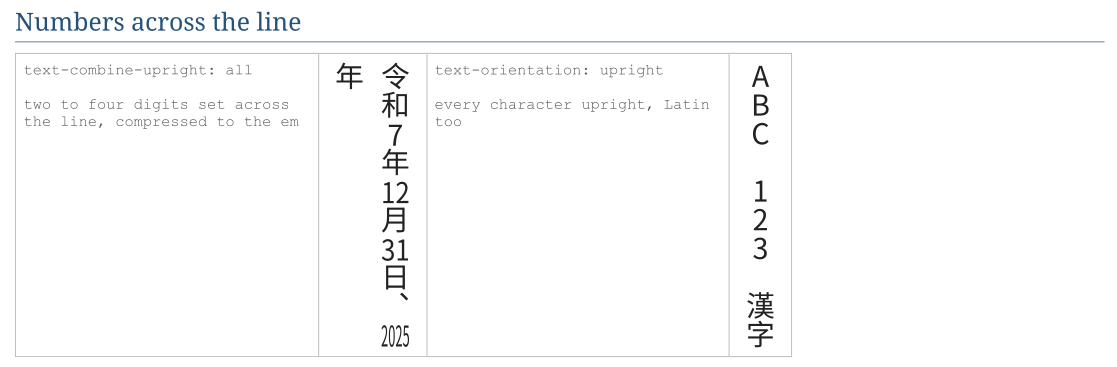
text-orientation: sideways turns every character, CJK too, as horizontal text turned clockwise. writing-mode: sideways-rl does the same; sideways-lr turns the text counter-clockwise and reads it bottom to top, its lines from left to right - the usual way to label a table column or a chart axis.
Images, font features and table cells
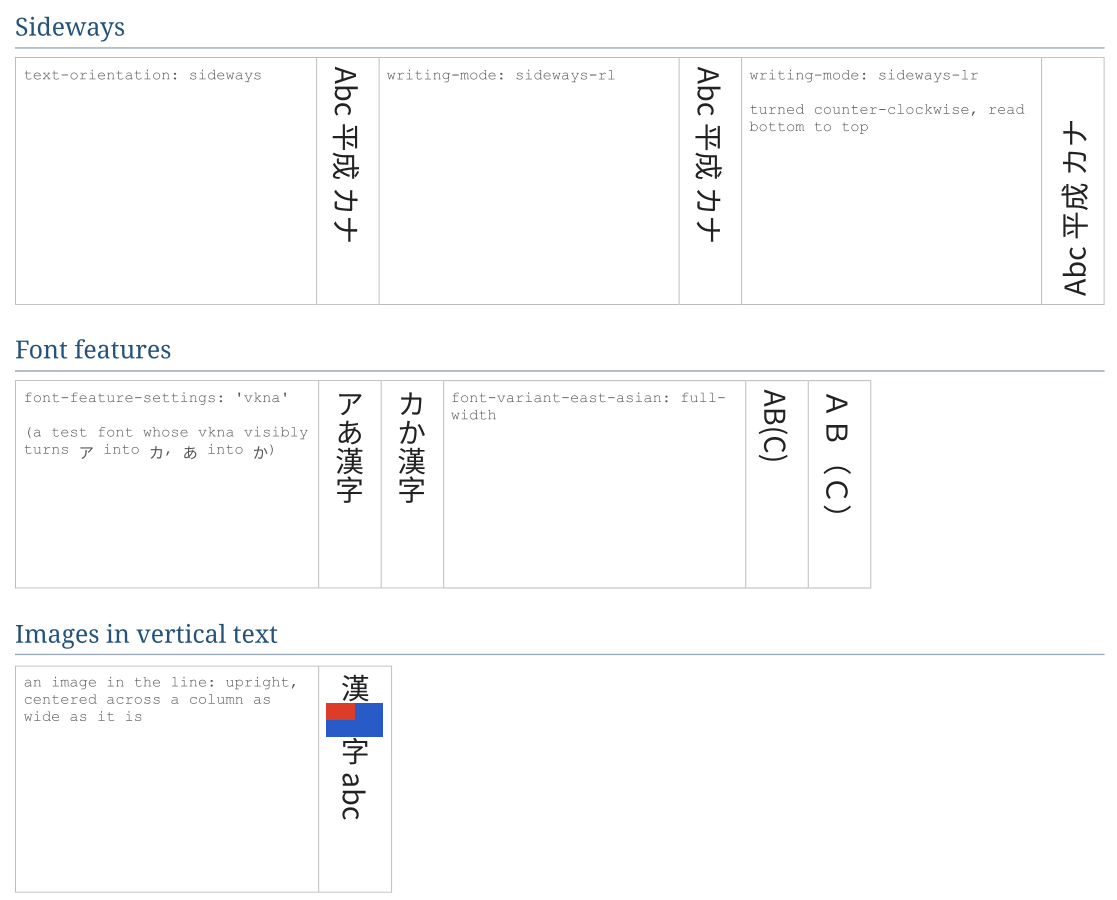
- Images and inline-blocks in a vertical line stay upright, centered across a line as wide as they are.
- Font features -
font-feature-settingssuch as"vkna"(vertical kana),font-variant-east-asian- apply to vertical text as to horizontal text, together with the vertical forms. - Table cells with vertical text are as wide as their lines;
text-alignandvertical-alignplace the text in the cell once the row's height is known.
RTF and DOCX output
Vertical text becomes Word's own vertical text - in table cells (text direction "top to bottom" or "bottom to top") and in text boxes - so it stays editable: vertical-rl with upright CJK as Word's East Asian vertical layout, sideways-lr bottom to top. Right-to-left text keeps its order. Word draws the text with its own line breaking, so the lines can end in other places than in the PDF.
Word has no equivalent for text-combine-upright (the digits are set along the line) and images inside vertical text are left out. Embed the fonts with setParam("pd4ml.docx.embed.fonts", "true") so that Word draws the text with them; see RTF and DOCX Output.
Limitations
- The vertical glyph positioning features of
GPOS(vkrn,vpal,vhal) are not applied. text-justifyis not supported.- Block-level elements inside a line of vertical text are not laid out in it; a vertical block's block children are stacked across it instead.
Sample documents
The screenshots on this page come from one sample document, converted by PD4ML v4.2 with the v42 engine:
- vertical-writing.htm - the HTML source, with its fonts (subsets of Noto Sans SC, Noto Serif, Noto Sans Hebrew and Noto Sans Arabic, SIL Open Font License)
- vertical-writing.pdf - the PDF
- vertical-writing.docx - the DOCX, its fonts embedded
- vertical-writing.rtf - the RTF