CSS Font Features: Ligatures, Small Caps, Figures and OpenType Typography
OpenType fonts hold more than one glyph per character: ligatures, real small capitals, old-style and tabular figures, fractions, ordinals, swashes, stylistic sets, the letter forms of a language. CSS chooses among them with font-variant-*, font-feature-settings and the lang attribute. PD4ML applies the font's substitutions itself, as Chrome does, so the PDF shows the typography the stylesheet asks for.
h1     { font-variant-caps: small-caps; }
.price { font-variant-numeric: oldstyle-nums tabular-nums; }
.intro { font-variant-ligatures: discretionary-ligatures; }
Available from PD4ML v4.2.0, with the v42 layout engine: call useHtmlRenderer(Constants.LayoutEngine.v42) before readHTML(). The v40 engine applies only a font's default ligatures (with enableLigatures(true)).
PD4ML pd4ml = new PD4ML();
pd4ml.useHtmlRenderer(Constants.LayoutEngine.v42);
pd4ml.readHTML(new URL("file:report.html"));
pd4ml.writePDF(new FileOutputStream("report.pdf"));
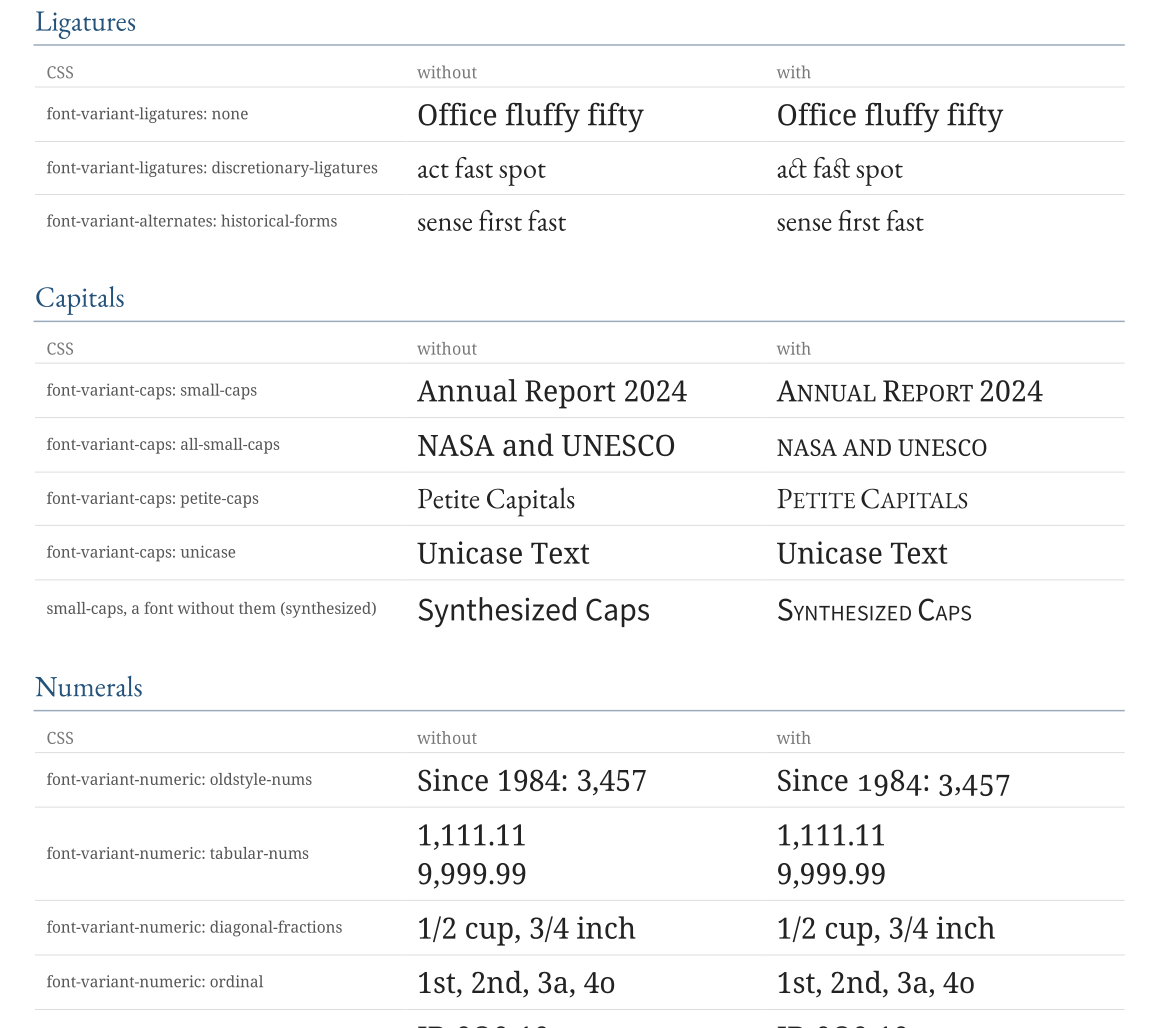
The features come from the font: they work with fonts that have them (an OpenType GSUB table), loaded with @font-face or from the configured font set. A font without small capitals or fractions draws the text as it is, apart from the fallbacks below. The screenshots on this page are PD4ML output of the sample document.
What is supported
| Property | Values | OpenType features |
|---|---|---|
font-variant-ligatures |
normal, none, [no-]common-ligatures, [no-]discretionary-ligatures, [no-]historical-ligatures, [no-]contextual |
liga clig, dlig, hlig, calt |
font-variant-caps |
small-caps, all-small-caps, petite-caps, all-petite-caps, unicase, titling-caps |
smcp, c2sc, pcap, c2pc, unic, titl |
font-variant-numeric |
lining-nums, oldstyle-nums, proportional-nums, tabular-nums, diagonal-fractions, stacked-fractions, ordinal, slashed-zero |
lnum, onum, pnum, tnum, frac, afrc, ordn, zero |
font-variant-position |
super, sub |
sups, subs |
font-variant-east-asian |
jis78 ... jis04, simplified, traditional, full-width, proportional-width, ruby |
jp78 ... jp04, smpl, trad, fwid, pwid, ruby |
font-variant-alternates |
historical-forms, stylistic(), styleset(), character-variant(), swash(), ornaments(), annotation() |
hist, salt, ss01-ss20, cv01-cv99, swsh, ornm, nalt |
@font-feature-values |
names for the font-variant-alternates functions, per font family |
|
font-variant |
shorthand of the above (and the font shorthand resets them) |
|
font-feature-settings |
any feature tags, "smcp", "ss03" 1, "liga" off |
any |
font-kerning |
auto, normal, none |
kern (pair kerning) |
lang, font-language-override |
a language (lang="sr"), an OpenType language tag ("SRB") |
locl |
font-synthesis |
weight, style, small-caps, none (and the font-synthesis-* longhands) |
|
text-transform |
full-width, full-size-kana (with uppercase, lowercase, capitalize) |
Every text also gets the font's default features: ccmp, locl, rlig, rclt, liga, clig and calt - as in browsers, common ligatures are on unless font-variant-ligatures turns them off.
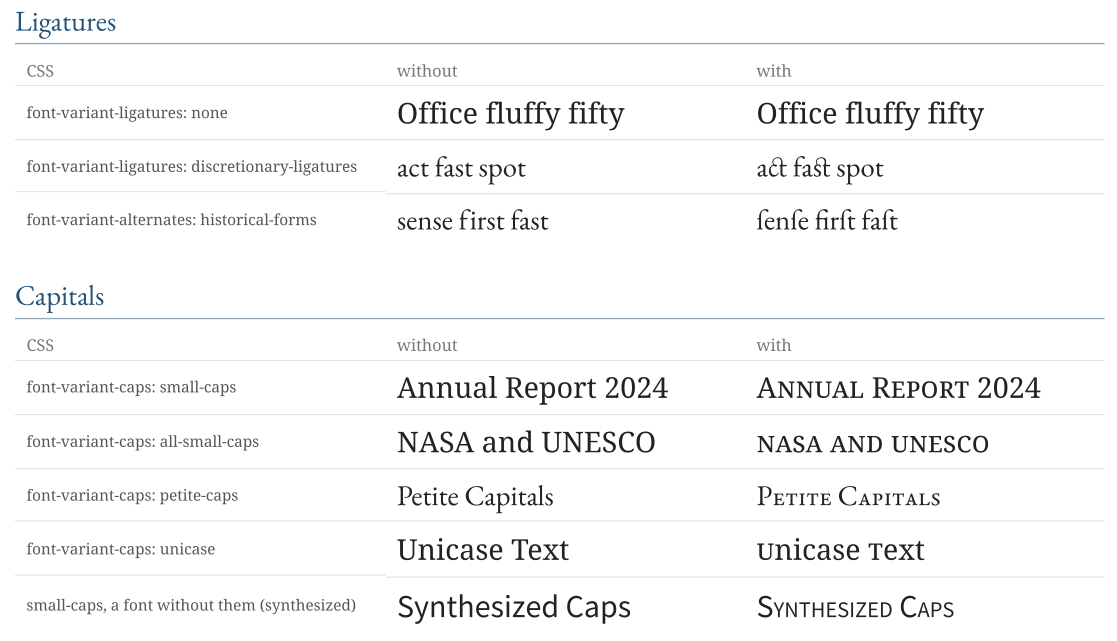
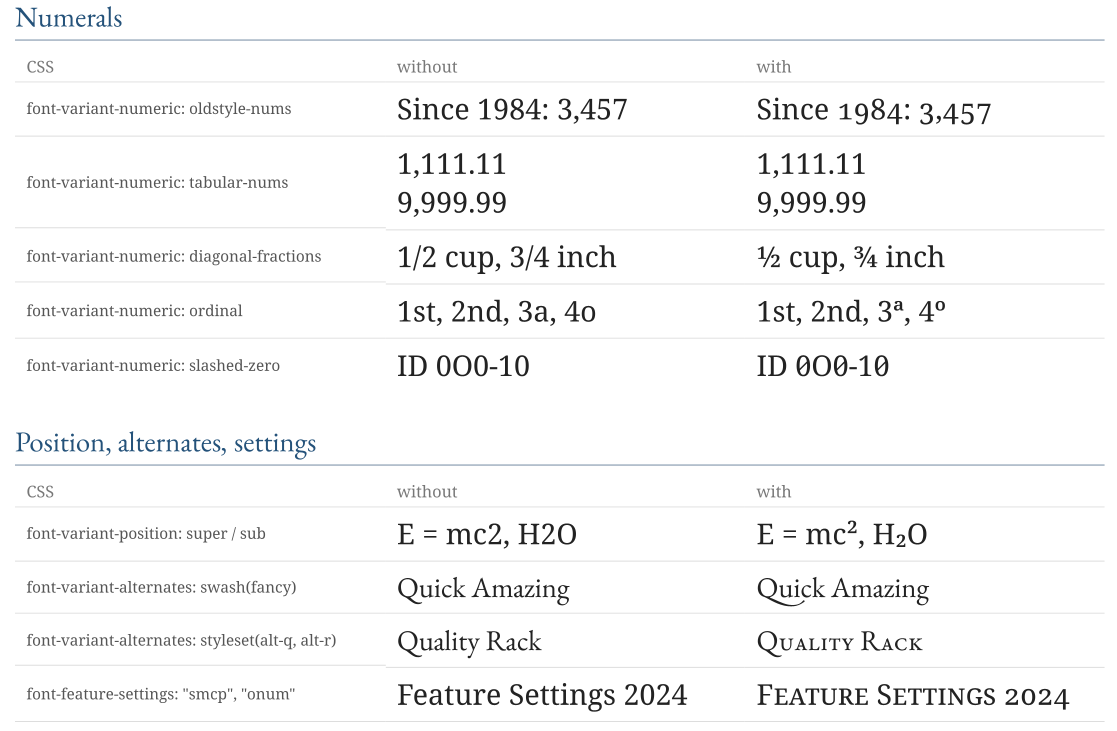
The PDF keeps the text: a ligature, a small capital or a fraction glyph copies as the characters it stands for, and searching the PDF finds them. (Capitals and lowercase letters that share small-capital glyphs copy as one of the two.)
Fallbacks and synthesis
PD4ML follows Chrome where a font lacks the glyphs a feature asks for:
- Small caps: without
smcp, small capitals are synthesized from the capitals at 70% of the size;font-synthesis: none(orfont-synthesis-small-caps: none) turns that off. - Petite caps fall back to the font's small caps (
pcaptosmcp,c2pctoc2sc), then to synthesized small caps; unicase withoutunicuses the font's small capitals of the capitals (c2sc). - Titling caps and superscripts/subscripts (
font-variant-position) are not synthesized: without the glyphs the text stays as it is. For raised and lowered text usevertical-align: super/subor<sup>/<sub>. - Bold and italic: a font family without a bold or an italic face gets one synthesized;
font-synthesis: none(or leavingweight/styleout of it) draws the regular face instead.
Languages
The lang attribute (or xml:lang) chooses the font's letter forms for a language - its locl substitutions: Serbian and Macedonian Cyrillic, Romanian and Moldavian comma-below letters, Japanese, Chinese and Korean forms of the same ideographs. font-language-override names the OpenType language system directly, for languages the attribute does not map.
<p lang="sr">бгдпт</p>
<p style="font-language-override: 'SRB'">бгдпт</p>
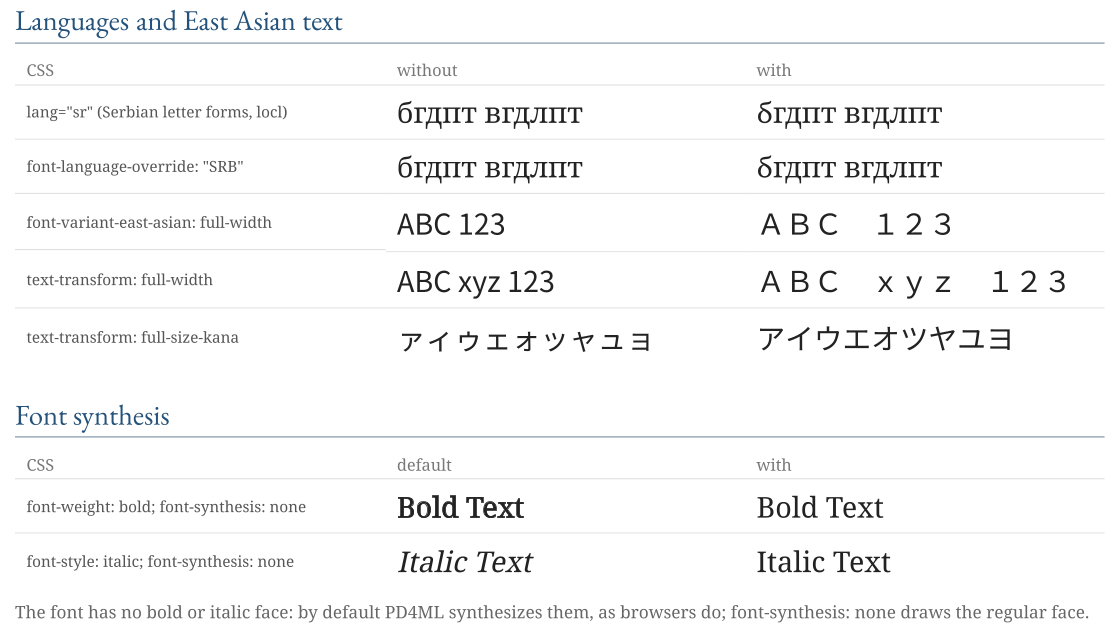
text-transform: full-width replaces characters by their full-width forms (ABC becomes ABC) and full-size-kana small kana by full-size ones (ァィゥ becomes アイウ), as the CSS Text specification defines them; Chrome does not implement either.
Kerning
font-kerning: normal kerns the text with the font's pair kerning (OpenType GPOS and kern), none turns it off, and auto - the default - follows applyKerning().
RTF and DOCX output
Word draws the text of a Word document itself, so the features have to reach it as Word's own settings. In DOCX output (Word 2010 and later) PD4ML writes:
| CSS | In Word |
|---|---|
| ligatures (standard, contextual, historical, discretionary) | Ligatures |
oldstyle-nums, lining-nums |
Number forms |
tabular-nums, proportional-nums |
Number spacing |
| stylistic sets | Stylistic set (the first one: Word applies one set) |
| contextual alternates | Contextual alternates |
font-kerning |
Kerning for fonts |
small-caps, petite-caps |
Small caps (Word's own); all-small-caps: small caps of the text in lowercase |
font-variant-position with the font's glyphs |
Superscript / subscript (also in RTF) |
Word has no equivalent for fractions, ordinals, the slashed zero, swashes, historical forms, East Asian widths, language forms or unicase: in Word output that text is plain. text-transform: full-width and full-size-kana change the text itself, so they carry over.
The features need the fonts: on a computer without them Word substitutes its own. With setParam("pd4ml.docx.embed.fonts", "true") the DOCX carries the fonts of the document - not the built-in fonts PD4ML maps to Arial, Times New Roman and Courier New, and not a font whose license (its embedding permissions) forbids it - so Word draws the text as the PDF has it. "true" embeds fonts of up to 10 MB each, "all" any size; embedding is off by default. RTF has no font embedding that Word reads.
pd4ml.setParam("pd4ml.docx.embed.fonts", "true");
pd4ml.writeDOCX(new FileOutputStream("report.docx"));
See RTF and DOCX Output.
Limitations
font-variation-settingsandfont-optical-sizingare not supported: a variable font is used at its default instance.- Text that needs complex shaping - Indic scripts, Arabic, Hebrew, Thai, Khmer and others - is shaped by Java's own text layout, with the font's default features; the CSS features above are not applied to it.
- Glyph positioning features beyond pair kerning (
GPOSmark positioning of Latin text,palt,halt) are not applied.
Sample documents
The screenshots on this page come from one sample document, converted by PD4ML v4.2 with the v42 engine:
- font-features.htm - the HTML source, with its fonts (subsets of Noto Serif, EB Garamond and Noto Sans SC, SIL Open Font License)
- font-features.pdf - the PDF
- font-features.docx - the DOCX, its fonts embedded
- font-features.rtf - the RTF