
Configuring PDF Fonts
The PD4ML PRO, DMS, and UA license tiers can embed any TrueType or OpenType font's full Unicode glyph range into the generated PDF, rather than relying only on PD4ML's own bundled font substitution. The mechanism behind this looks more involved than it needs to at first glance, and for a specific reason: in ordinary Java code, instantiating a java.awt.Font for a given face name and asking it for metrics is trivial, but PDF generation needs more than that. To embed a font (and to subset it down to only the glyphs actually used, keeping file size reasonable), PD4ML needs direct access to the underlying .ttf/.otf file itself -- and Java's own Font API offers no way to recover that file's location from a Font object. The practical workaround is a small mapping file, associating each font face name with the actual file that provides it. PD4ML's default name for this file is pd4fonts.properties.
As of v4.0.16, an interactive alternative to hand-building this file is also available: the PD4ML fonts tool walks through the same configuration visually rather than via the command line.
Indexing a specific set of fonts
The common case: collect the TTF/OTF files a project actually needs into their own directory, then index that directory once, ahead of time, with the bundled command-line tool:
java -Xmx512m -jar pd4ml.jar -configure.fonts /path/to/my/fonts/
pd4ml.useTTF("/path/to/my/fonts/");
// or identically
pd4ml.useTTF("/path/to/my/fonts/pd4fonts.properties");
Indexing system fonts (read-only directories)
A system font directory (c:/windows/fonts, /usr/share/fonts, ...) usually can't be written to by an application process. Passing a second, writable path to -configure.fonts generates the mapping file there instead, while its entries still point back at the original, read-only font directory:
java -Xmx512m -jar pd4ml.jar -configure.fonts c:/windows/fonts/ c:/path/to/my/config
pd4ml.useTTF("c:/path/to/my/config");
// or identically
pd4ml.useTTF("c:/path/to/my/config/pd4fonts.properties");
Runnable example: N002TtfFonts.java -- indexes c:/windows/fonts into a separate pd4fonts.properties, then passes it to useTTF(...).
Generating the mapping on the fly
Rather than running the CLI tool as a separate step, passing true as a second argument to useTTF(...) builds (or refreshes) pd4fonts.properties automatically the first time it's needed:
pd4ml.useTTF("/path/to/my/fonts/", true);
This is convenient for a quick setup, but for a large font directory the indexing cost is paid on that request rather than ahead of time -- for anything beyond occasional/development use, pre-generating the file with the CLI tool (above) avoids repeating that cost on every cold start.
Runnable example: N001TtfFonts.java
Filtering which fonts get indexed
When only a handful of fonts within a large system directory actually matter, a comma-delimited list of name patterns limits indexing to just those, keeping an in-memory, on-the-fly mapping fast even against a directory with hundreds of installed fonts:
pd4ml.useTTF("c:/windows/fonts/", "arial,times,courier");
Packaging fonts into a JAR
For a web application deployment where arbitrary filesystem paths aren't available or desirable, fonts (and their generated pd4fonts.properties) can be packaged into an ordinary JAR alongside the application's other resources, then addressed with PD4ML's java: resource-URL scheme:
java -Xmx512m -jar pd4ml.jar -configure.fonts /path/to/my/fonts/

jar cvf fonts.jar /path/to/my/fonts/
pd4ml.useTTF("java:fonts/");
Web fonts via @font-face
Fonts can also be pulled in the same way a browser would, via an ordinary CSS @font-face rule -- either from a bundled resource, or fetched directly from a remote server -- without any dedicated useTTF(...) call at all. Both local (java:) and remote (https://) sources work, and either TTF or WOFF format:
@font-face {
  font-family: "Consolas";
  src: url("java:/html/rc/FiraMono-Regular.ttf") format("ttf");
}
@font-face {
  font-family: 'Open Sans';
  font-style: normal;
  font-weight: 400;
  src: url(https://fonts.gstatic.com/s/lato/v11/qIIYRU-oROkIk8vfvxw6QvesZW2xOQ-xsNqO47m55DA.woff) format('woff');
}
Runnable examples: H001ConvertHtml.java (a bundled java: TTF resource), Z001ConvertHtml.java (a font fetched over https://).
Font kerning
Kerning nudges the spacing between specific pairs of characters in a proportional font closer together or further apart than their default advance widths would otherwise place them -- classic examples being the tight overlap of "AV" or "Wa". Applied correctly, it reads as more visually polished; left off, tightly-spaced letter pairs can look loose or unevenly spaced compared to the rest of the line:
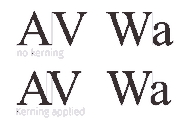
pd4ml.applyKerning(true);
Running PD4ML as the standalone command-line tool achieves the same with the -kerning flag.
See also
- PD4ML Programmer's Manual -- §9 covers
useTTF(...),embedTTFs(...),applyKerning(...), andenableLigatures(...)together as one topic. - PD4ML fonts tool -- the interactive, browser-based alternative to the
-configure.fontscommand-line flow described above.