
RTF and DOCX Output
Beyond PDF, PD4ML's two-phase conversion model (see the Programmer's Manual's reading/writing the output section) extends to two further destination formats: RTF and OOXML/DOCX. The same parsed HTML document that produces a PDF can, without being re-parsed, also be serialized as an RTF file (opened by MS Word, WordPad, and most legacy word processors) or a modern DOCX file -- letting one source template feed a print-ready PDF and an editable, reader-facing office document from a single conversion pass. Because the two formats share almost the same conversion pipeline, supported HTML feature set, and reference application code, this page covers both together, calling out the handful of places they diverge.
MS Word is the reference target for both formats: it has by far the most complete and predictable support for the HTML/CSS feature set PD4ML maps onto RTF and DOCX markup, and is the environment PD4ML's own conversion logic is validated against. Other readers (WordPad, LibreOffice, older or third-party RTF/DOCX parsers) generally cope with the same output, but with more variable fidelity -- worth keeping in mind before committing to a reader other than Word for a given deployment.
Supported HTML features
Both formats cover the same practical subset of HTML/CSS: page margins, character- and paragraph-level text formatting, page backgrounds, ordered and unordered lists, tables -- including nested tables -- images, hyperlinks, repeating headers/footers, and forced page breaks. Nested-table support specifically matters more than it might first appear: neither RTF nor DOCX gives an inline-level element a native way to carry block-level formatting (a background color or border on a <span>, for instance) on its own, so PD4ML's converters fall back to wrapping such content in a single-cell table, the same workaround word processors themselves rely on. The practical effect is that a source document making heavy use of nested layout tables for styling purposes tends to convert with high fidelity.
Triggering the conversion
As with PDF, a conversion can be started from the Java API, the JSP taglib, or the command line. All three ultimately call the same underlying converter; which one to reach for is purely a matter of where in an application the conversion needs to happen.
RTF
// read and parse HTML
pd4ml.readHTML(inputStream);
boolean convertImagesToWmf = true; // 'true' improves compatibility but increases resulting file size
pd4ml.writeRTF(outputStream, convertImagesToWmf);
<pd4tl:transform ... outputFormat="rtf"> ... </pd4tl:transform>
<pd4tl:transform ... outputFormat="rtfwmf"> ... </pd4tl:transform>
java -Xmx512m -Djava.awt.headless=true -jar ./pd4ml.jar <URL> 1200 -out doc.rtf -outformat rtf
java -Xmx512m -Djava.awt.headless=true -jar ./pd4ml.jar <URL> 1200 -out doc.rtf -outformat rtfwmf
The boolean argument to writeRTF(...) (equivalently, the choice between the plain rtf and rtfwmf output formats on the taglib/CLI) controls how embedded images are encoded. Plain RTF keeps each image in its original format; RTF_WMF re-encodes every image as WMF (Windows Metafile) instead, which is what lets older or more limited RTF readers -- WordPad chief among them -- display images at all, at the cost of a noticeably larger output file. Reach for the WMF variant only when a target reader specifically needs it.
DOCX
// read and parse HTML
pd4ml.readHTML(inputStream);
pd4ml.writeDOCX(outputStream);
<pd4tl:transform ... outputFormat="docx"> ... </pd4tl:transform>
java -Xmx512m -Djava.awt.headless=true -jar ./pd4ml.jar <URL> 1200 -out doc.docx -outformat docx
writeDOCX(...) has no WMF-equivalent counterpart -- OOXML's native image embedding is already broadly compatible across DOCX readers, so there's no legacy-compatibility trade-off to make here the way there is for RTF.
A complete converter application
The reference converter below reads a URL and writes an RTF file, configuring page size, orientation, and margins along the way; producing DOCX instead is a one-line change; substitute pd4ml.writeDOCX(fos) for the pd4ml.writeRTF(fos, contvertImagesToWmf) call, and adjust the output file's extension. Two API styles are shown, matching the two shown throughout the v3 to v4 Migration Guide:
package samples;

import java.io.File;
import java.io.IOException;
import java.net.MalformedURLException;
import java.net.URL;
import java.security.InvalidParameterException;

import com.pd4ml.Dimensions.Units;
import com.pd4ml.PD4ML;
import com.pd4ml.PageMargins;
import com.pd4ml.PageSize;

public class GettingStarted2 {
    protected int topValue = 10;
    protected int leftValue = 20;
    protected int rightValue = 10;
    protected int bottomValue = 10;
    protected int userSpaceWidth = 1300;

    public static void main(String[] args) {
        try {
            GettingStarted2 jt = new GettingStarted2();
            jt.doConversion("https://pd4ml.com/i/rtf/demo.htm", "c:/invoice.rtf");
        } catch (Exception e) {
            e.printStackTrace();
        }
    }

    public void doConversion( String url, String outputPath )
                throws InvalidParameterException, MalformedURLException, IOException {
        File output = new File(outputPath);
        java.io.FileOutputStream fos = new java.io.FileOutputStream(output);

        PD4ML pd4ml = new PD4ML();

        pd4ml.setHtmlWidth(userSpaceWidth); // set frame width of "virtual web browser"

        // choose target paper format and "rotate" it to landscape orientation
        pd4ml.setPageSize(PageSize.A4.rotate());

        // define page margins
        pd4ml.setPageMargins(new PageMargins(topValue, leftValue, bottomValue, rightValue, Units.MM));

        // read and parse HTML
        pd4ml.readHTML(new URL(url));
        boolean contvertImagesToWmf = false;
        pd4ml.writeRTF(fos, contvertImagesToWmf);  // actual document conversion from URL to RTF file
        fos.close();

        System.out.println( outputPath + "\ndone." );
    }
}
package samples;

import java.awt.Insets;
import java.io.File;
import java.io.IOException;
import java.net.MalformedURLException;
import java.net.URL;
import java.security.InvalidParameterException;

import org.zefer.pd4ml.PD4Constants;
import org.zefer.pd4ml.PD4ML;

public class GettingStarted2 {
    protected int topValue = 10;
    protected int leftValue = 20;
    protected int rightValue = 10;
    protected int bottomValue = 10;
    protected int userSpaceWidth = 1300;

    public static void main(String[] args) {
        try {
            GettingStarted2 jt = new GettingStarted2();
            jt.doConversion("https://pd4ml.com/i/rtf/demo.htm", "c:/invoice.rtf");
        } catch (Exception e) {
            e.printStackTrace();
        }
    }

    public void doConversion( String url, String outputPath )
                throws InvalidParameterException, MalformedURLException, IOException {
        File output = new File(outputPath);
        java.io.FileOutputStream fos = new java.io.FileOutputStream(output);

        PD4ML pd4ml = new PD4ML();

        pd4ml.setHtmlWidth(userSpaceWidth); // set frame width of "virtual web browser"

        // choose target paper format and "rotate" it to landscape orientation
        pd4ml.setPageSize(pd4ml.changePageOrientation(PD4Constants.A4));

        // define page margins
        pd4ml.setPageInsetsMM(new Insets(topValue, leftValue, bottomValue, rightValue));

        // Force generate RTF instead of PDF
        pd4ml.outputFormat(PD4Constants.RTF_WMF);

        pd4ml.render(new URL(url), fos); // actual document conversion from URL to RTF file
        fos.close();

        System.out.println( outputPath + "\ndone." );
    }
}
For DOCX, the legacy-API equivalent follows exactly the same pattern, substituting pd4ml.outputFormat(PD4Constants.DOCX) for PD4Constants.RTF_WMF (DOCX has no WMF variant to choose between, per the note above).
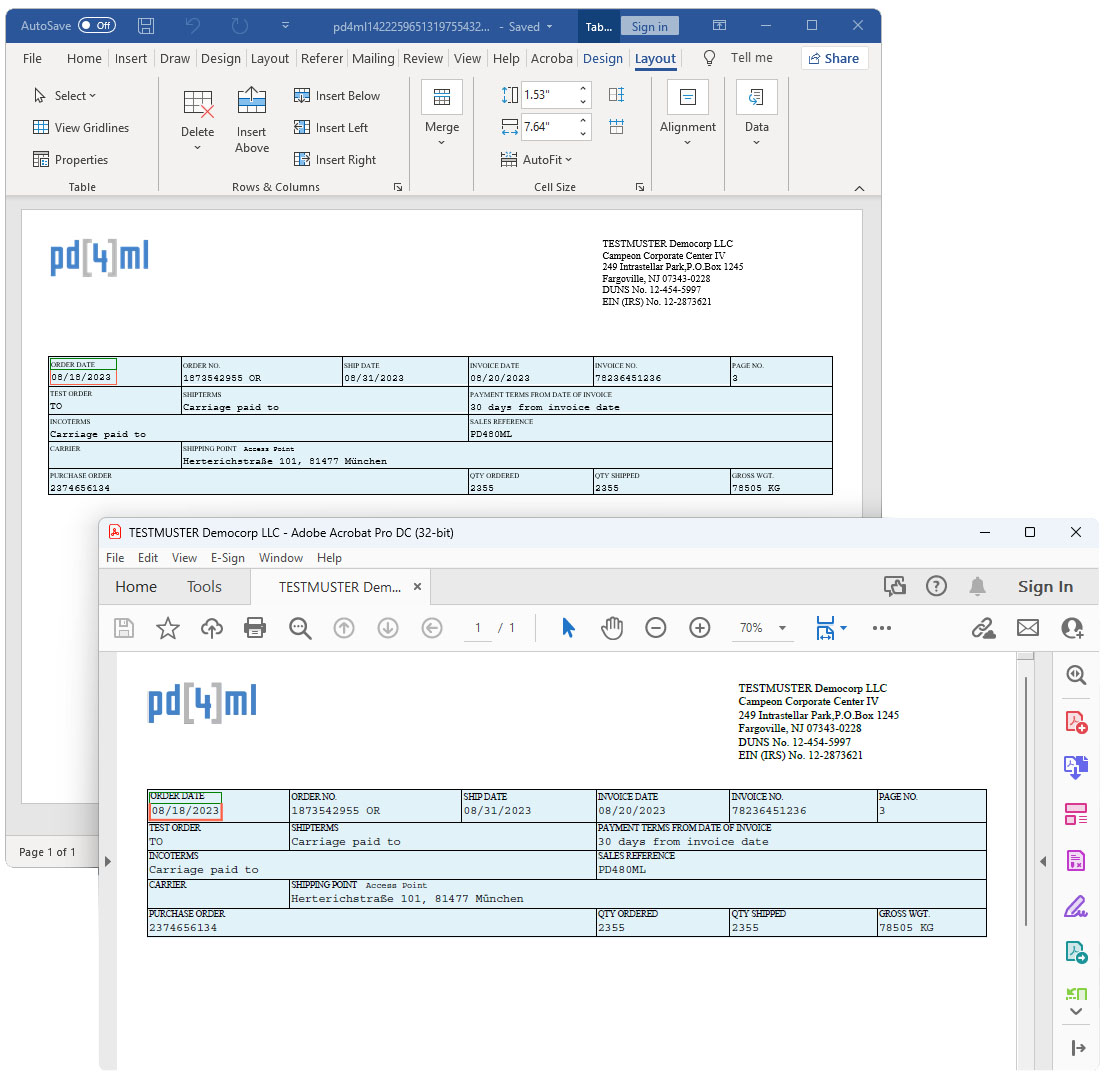
Demo: the same source rendered three ways
A single source HTML document run through the converters above produces the following reference outputs, useful for comparing fidelity across formats or as a starting point for experimenting with the API calls above:
| Output | Link |
|---|---|
| Source HTML | demo.htm |
| RTF result | pd4ml.rtf |
| RTF result, as plain text | pd4ml.txt |
| DOCX result | pd4ml.docx |
| Equivalent PDF, for comparison | pd4ml.pdf |
See also
- PD4ML Programmer's Manual -- §6.3 covers
writeRTF/writeDOCXalongsidewritePDFandrenderAsImagesin the current API's two-phase model. - PD4ML v3 to v4 Migration Guide -- background on the
org.zefer.pd4ml/legacy vs.com.pd4ml/current API styles shown side by side above.