Tweaking Fonts in PDF


If the font in the generated PDF document does not match the font style defined in the HTML/CSS, first ensure that the font mapping is configured correctly.

Ideally, the font-family parameter (e.g., font-family: My Font) should correspond to the font key in the pd4fonts.properties file:

My\ Font=mybrandfont.ttf

(The space in the key name is escaped with a backslash.)

If the required font appears in the pd4fonts.properties file under a different name, for example:

My\ Brand\ Font=mybrandfont.ttf

you have two options:

  1. Modify the HTML or CSS to reference the registered font name: font-family: My Brand Font;
     
  2. Add a new entry to the pd4fonts.properties file using the exact font name actually applied in the code:
     
    My\ Brand\ Font=mybrandfont.ttf
    My\ Font=mybrandfont.ttf
    

    If for any reason you are using the actual TTF filename directly in your HTML/CSS (font-family: mybrandfont;), you can also add the corresponding key to the mapping file:

    My\ Brand\ Font=mybrandfont.ttf
    My\ Font=mybrandfont.ttf
    mybrandfont=mybrandfont.ttf

If the names of the fonts used in HTML are not known in advance, there is a high probability that font substitution fallback logic will be triggered. In such a case, the system will select any font belonging to the same typeface category (serif, sans-serif, or monospace) that is capable of displaying the specified text.

However, some fonts cannot be automatically assigned to a specific typeface category, so a bit of manual tweaking would help.

PD4ML supports a list of predefined placeholders for fallback font names, covering three font family categories (five for each):

customserif1
...
customserif5

customsans1
...
customsans5

custommono1
...
custommono5

Thus, you can add your font to a fallback list:

customsans1=mybrandfont.ttf

or even to all the lists at once if you prefer that this font be used in place of any missing ones

customserif1=mybrandfont.ttf
customsans1=mybrandfont.ttf
custommono1=mybrandfont.ttf

PD4ML Fonts Tool


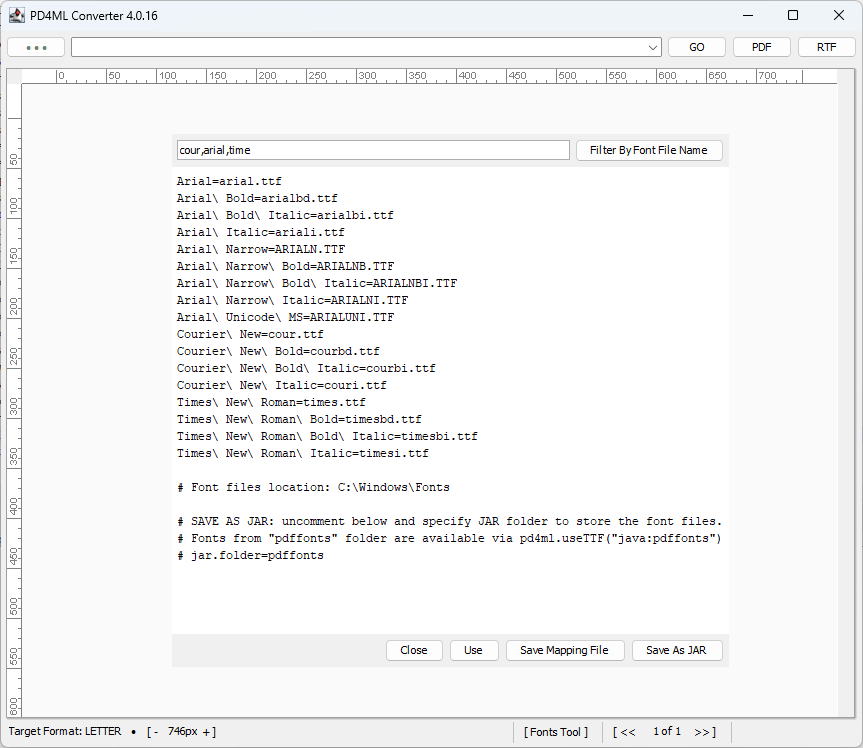
To simplify the creation of font mapping files, PD4ML v4.0.16 introduces a handy tool. The tool is implemented as an utility of the interactive PD4ML Converter

How to use it

Run the converter, as described by the link /support-topics/pd4ml-v4-programmers-manual/ and click the [Fonts Tool] button on the status bar of the application window.

It will prompt you for the location of the font directory. Select a directory. We can start with system fonts like C:\Windows\Fonts

Because the system font directory contains an excessive number of fonts that your application doesn’t really need, you can filter them out by entering a comma-separated list of font name patterns in the input field next to the “Filter by Font File Name” button. Apply the filter by pressing the button. The resulting list will include only those fonts whose filenames case-insensitively match the given patterns.

The generated list is editable, so you can manually refine it.

At this point you have four options:

  • Close – is obvious: close the tool and lose the current font mapping configuration
  • Use – use the font configuration only in the current session of the PD4ML Converter, without saving it.
  • Save Mapping File – creates a pd4fonts.properties file that can later be referenced from your application with pd4ml.useTTF() API call. If the chosen mapping file location is different from the original font directory (which is a good idea if you are using the system font directory), pd4fonts.properties will include a link to the font dir, allowing PD4ML to find the actual font files.
  • Save as JAR – packages the listed fonts and the corresponding pd4fonts.properties into a JAR file. Fonts are stored in the “pdffonts” JAR subdirectory by default, so once the JAR is deployed with a PD4ML-enabled application, the font configuration can be referenced with pd4ml.useTTF("java:pdffonts") API call. The subdirectory name can be customized by uncommenting and setting the jar.folder=pdffonts property.

Automatic Font Kerning Support


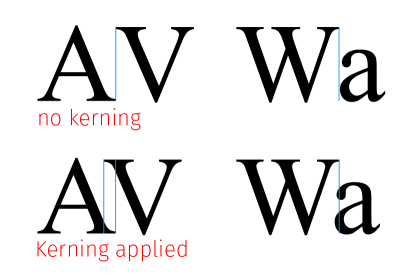
PD4ML v4.0.4 introduces optional font kerning support. Kerning is an addition or reduction of space between two characters (glyphs) of a proportional font. As a rule a rendered text is visually much more pleasing when the kerning is applied.

PD4ML uses kerning pairs info from TTF/OTF fonts (if available). For the standard built-in Type1 fonts the kerning info is known and included to PD4ML product itself.

The feature is also implemented in our older development branch v3.11.0 due to its importance